Owner visibility
Your business, all in one place.
A home screen to see what’s happening, understand what needs attention, and make better decisions, faster.

Daunte Benjamin
November 18, 2026
6
min read
A home screen to see what’s happening, understand what needs attention, and make better decisions, faster.
A home screen to see what’s happening, understand what needs attention, and make better decisions, faster.
Your phone has a home screen. Your business should, too.
Think about it: you don’t open every app on your phone to figure out what needs your attention. Your home screen gives you a starting point.
Running a business rarely feels that simple. Sales are in one tool. Financials are in another. Project updates are in messages, and the instructions for getting work done are somewhere in a shared folder. You see pieces of the business throughout the day, but getting the whole picture takes work.
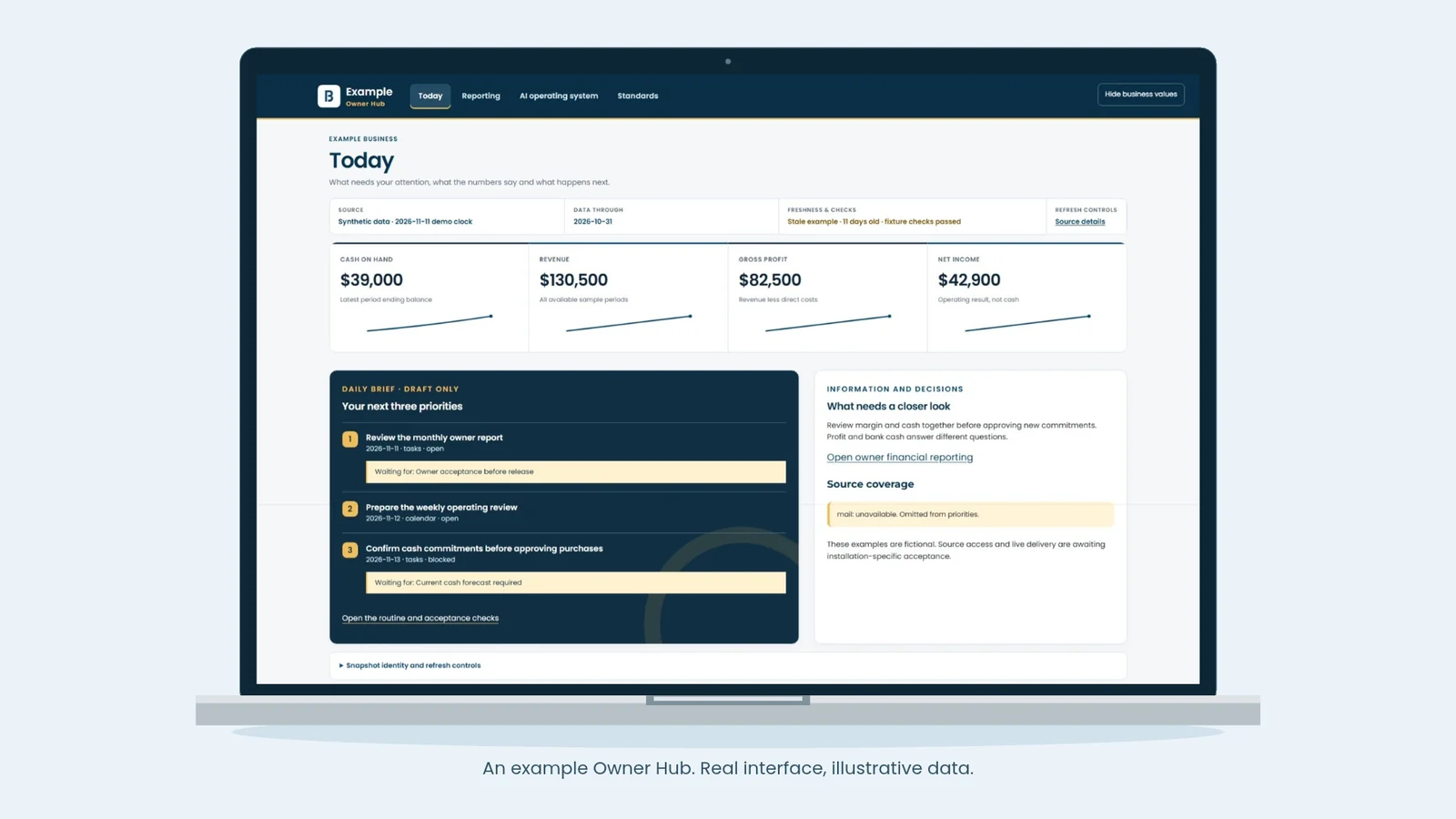
An Owner Hub brings those pieces into one consistent view. Start with the big picture: financial performance, sales, marketing, projects, and your team. Then open the details to see what’s moving, what’s falling behind, or which document or process can help. Like your phone’s home screen, it gives you one starting point with easy access to the views you need.
With the right connections and permissions, AI can help you understand what you’re seeing and prepare the next step. You spend less time gathering updates and more time directing the business.
Imagine coaching a basketball game with no scoreboard. You can see everyone working hard, but are you ahead or behind? How much time is left? Does the team need to change its approach?
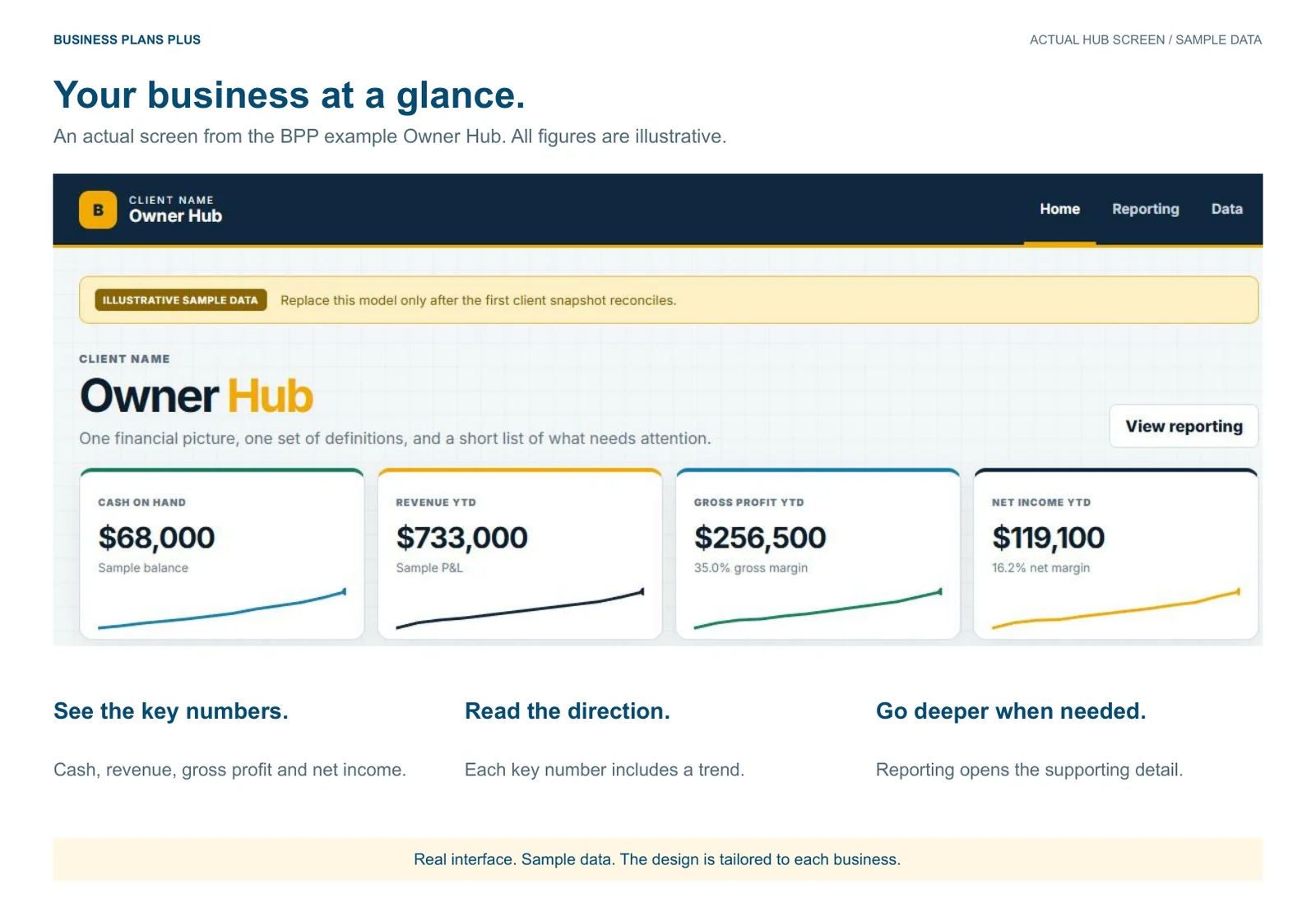
A business dashboard is your scoreboard. It brings the important measures from across the business into view: financial performance, marketing results, sales, project delivery, and people or HR. You can see where things stand and where to look closer, instead of judging the business by how busy everyone feels.
But the score does not tell you which play to run. Your documents hold the business facts, decisions, and context behind the numbers. Your standard operating procedures, or SOPs, are part of that playbook: how you work, who does what, and what happens next.
Imagine you signed three new clients last week. Sales look good, but none of the projects has started. What is holding them up?
From the hub, you open the onboarding view. One client still owes a deposit. Another has paid, but the team is waiting for access to their files. The third has everything in, but nobody has been assigned to schedule the kickoff. Three clients, three different next steps.
Beside those statuses are the agreed scope, the onboarding SOP, and the person responsible for each handoff. The team can send the payment reminder, request access, and assign the kickoff. You can see what is ready to start before promising another delivery date. That is more useful than a chart that says “three new clients.”
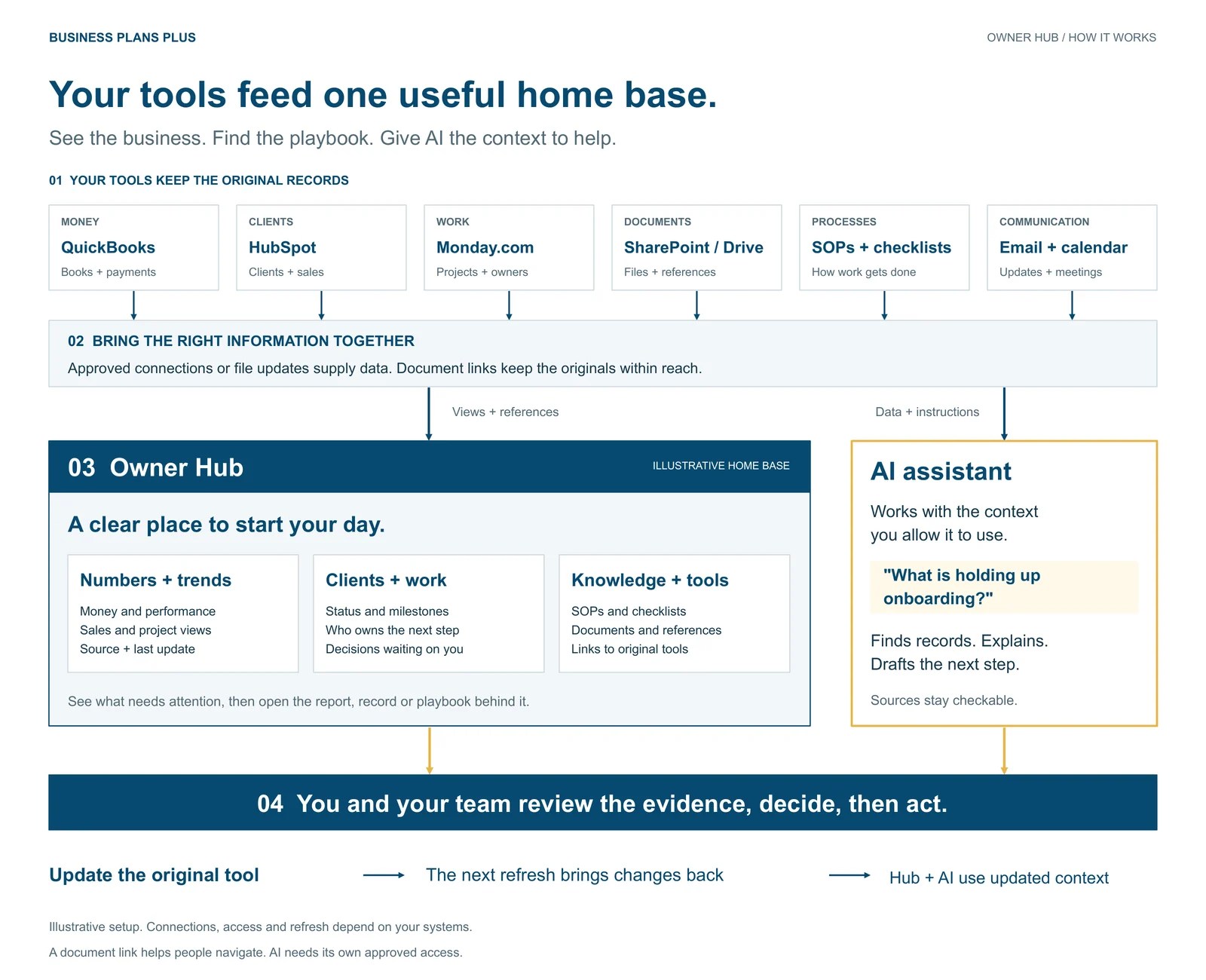
The original records stay in their sources of truth: the systems where those records are maintained. Your books stay in your accounting system, like QuickBooks. Customer records and deal information stay in your CRM, like HubSpot. Approved documentation stays in shared folders, like Google Drive or OneDrive. The hub gives your team a place to find those records and use them, without keeping a second set up to date.
Before choosing charts or connecting AI, write down the questions that interrupt your week.
Choose questions that fit how your business runs. Here are five places to start:
The question gives the information a purpose. It also tells you which documents belong nearby.
Return to those three clients. Instead of asking AI a broad question like “How do I improve onboarding?”, you could ask:
Review the clients waiting to start. Tell me what is blocking each one, link the relevant scope and onboarding steps, and draft the next action for the person responsible. Flag anything you cannot verify.
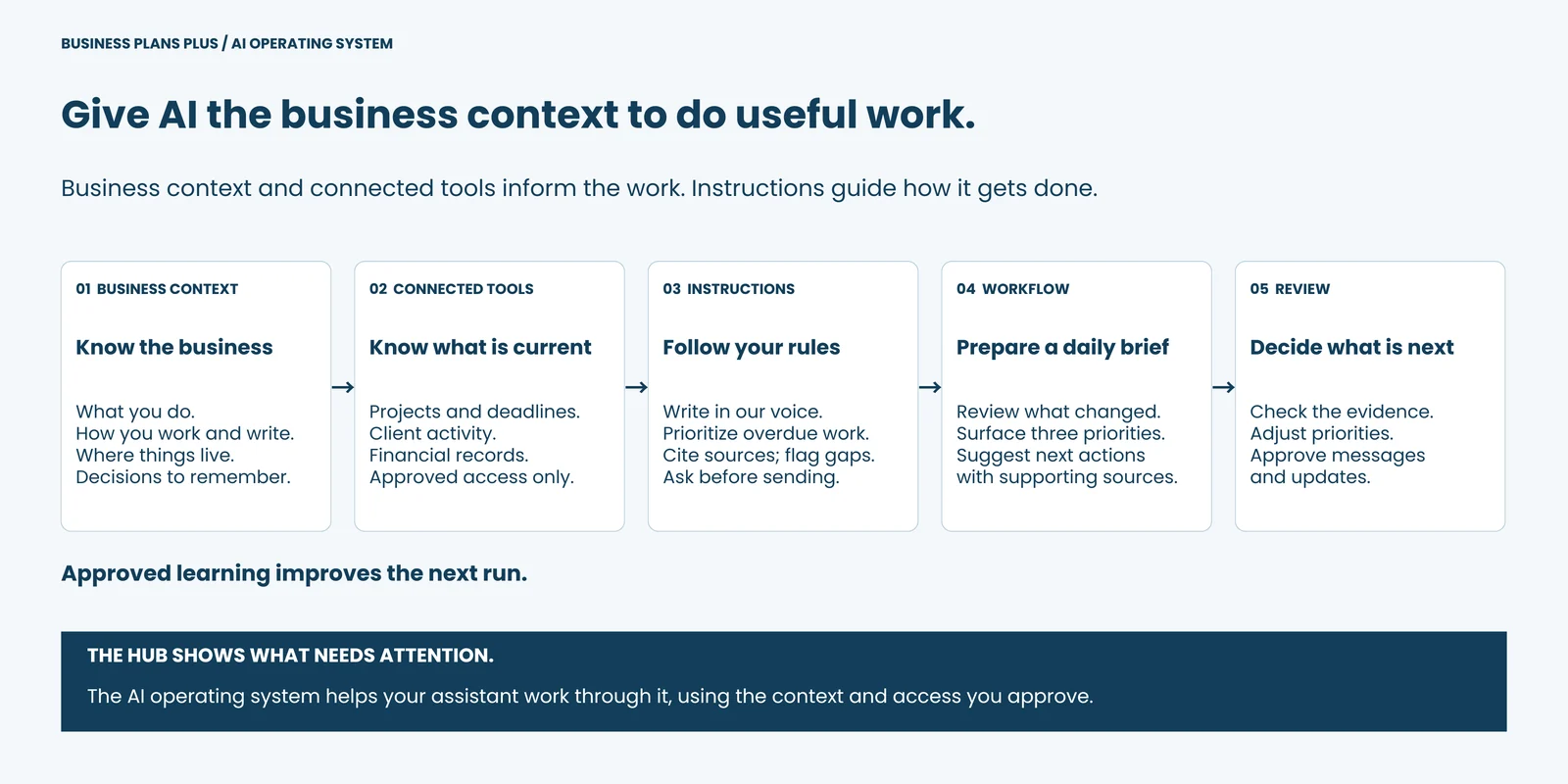
Think of it like bringing someone onto your team. They need to know how you work, where to find things, and what they can decide on their own. Your business context supplies that background. Connected tools supply current information, such as project status and deadlines.
You might use Claude, Claude Code, ChatGPT, Gemini, Perplexity, or another AI tool. What it can read or change depends on the product, plan, and connections you set up. Give it the information it needs, instructions for how to work, and a specific job.
That setup is what we mean by an AI operating system. A daily brief is one job it can help with:
With supported connections, you can ask AI to refresh a report, update a task, or revise a document in plain language. You do not have to write code to make the request. Set the boundaries first: reading a report is different from changing the records behind it.
A connector lets approved software access another system; an API is the interface they use to exchange information. Claude’s connector guide is one example of how that access works, not a requirement to use Claude. Depending on the tool, you may work through connections or selected files and exports. A document link alone does not give AI permission to read it.
If a card says “revenue,” does it mean invoices issued, payments received, or revenue recorded in the books? If AI says a job is over budget, which costs and dates did it use?
You should spend more time deciding what comes next and less time piecing together what happened.
Show where the information came from, what the number means, and how current it is. “Time entries complete through Friday” is more useful than a screen that refreshed this morning but still lacks yesterday's work.
For financial reporting, that means being able to move beyond a headline number into the statements behind it. Profit, cash flow, and the balance sheet answer different questions. The SEC’s plain-language guide explains how they connect.
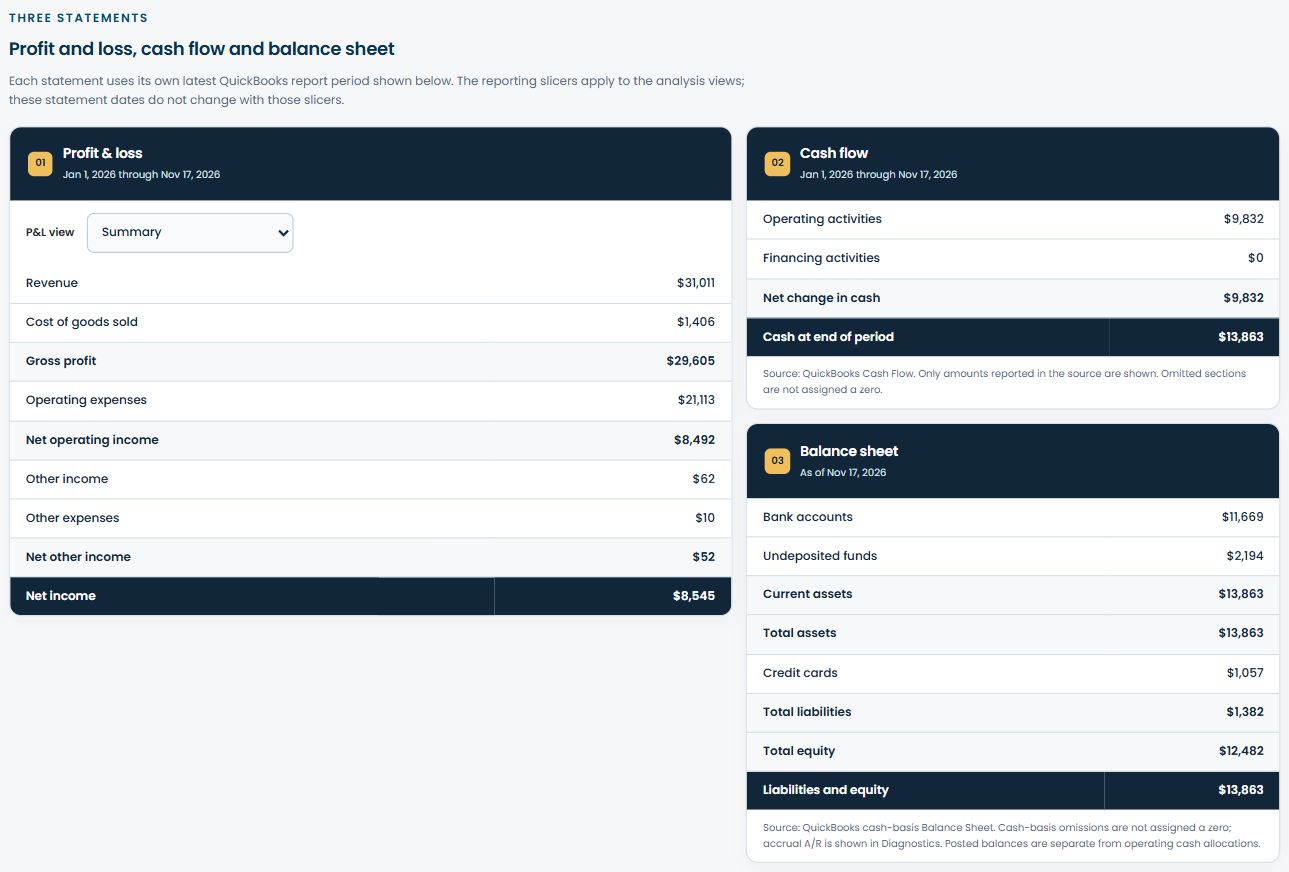
Explore the expanded Statements view
Pick one part of the week that always sends you searching: a new-client handoff, a team meeting, or your Friday review. Bring the numbers, documents, next steps, and people responsible into one place.
Try it with your team. Can they find what they need and act without asking you where everything is? Use that answer to decide what belongs in the hub next. Our business tools and resources offer other ways to examine how the work runs.
At BPP, we build that home base around how your business works: dashboards that answer your questions, documents and SOPs you can find, and AI that can help with the work. We start with your tools and the decisions you need to make.
Ready to give your business a home screen? Let's talk through it.
Book a free 30-minute consultation. We’ll map your bottlenecks and show you the systems that would make your business easier to run.
Book a free consultation